
Product · Acceleration & 3D Lashing
Motion, Forces and Lashing Checks in One Environment
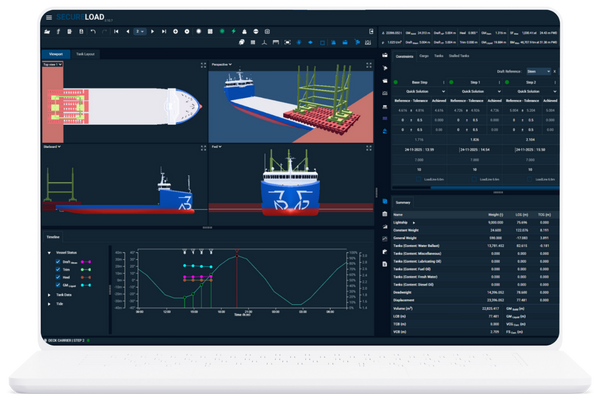
SecureLoad Acceleration & 3D Lashing uses realistic vessel motions and cargo geometry to check accelerations, forces and lashing layouts before you sail.
Built for heavy-lift and complex breakbulk, it helps engineers and port captains design lashings that meet standards and are practical on deck.
From Rule-of-Thumb to Physics-Guided Lashing
SecureLoad Acceleration & 3D Lashing helps you move beyond generic tables and rule-of-thumb factors.
By capturing seaway loads, applying recognised standards and documenting every assumption, it reduces rework on deck and disputes with surveyors or clients.
Realistic Acceleration Environment
3D Lashing on Real Geometry

Transparent, Documented Checks
What Acceleration & 3D Lashing Covers
Acceleration & Loads
Sea States and Motion Envelopes
Define sea states, routes or motion envelopes according to your engineering approach, rather than relying on fixed generic factors.
Accelerations at Cargo CoG
Compute accelerations at the cargo centre of gravity and other key points that drive seafastening loads.
Forces on Supports and Lashings
Translate accelerations into forces on supports, grillages and lashings so you see where loads actually go.
Lashing Design
3D Lashing Layout
Place and configure lashings directly in 3D on real cargo and deck geometry—angles, connection points and pre-tension included.
Checks Against Standards
Evaluate lashing arrangements against relevant codes and criteria, using methods aligned with recognised guidance.
Utilisation and Safety Margins
See utilisation factors, safety margins and potential weak links so you can strengthen or simplify the arrangement before it reaches the deck.
Outputs Built for Surveyors and Clients
Technical Outputs
Load Case Summaries
Summaries of accelerations, forces and utilisation for each load case, captured in a form engineers and surveyors can follow.
Lashing Lists
Structured lists of lashings with types, positions, angles and pre-tensions for each arrangement.
Utilisation vs. Limits
Clear utilisation figures against allowed limits, highlighting where margins are tight or where reserve capacity exists.
Visual Documentation
2D / 3D Arrangement Views
2D and 3D views of lashing arrangements on the actual cargo and deck geometry, ready to drop into method statements and reports.
Critical Points & Remarks
Call-outs for critical points, special requirements and engineering remarks that need attention on board or in review.
Export for Approvals & Records
Export documentation to PDF and image formats so surveyors, clients and internal stakeholders can review, approve and archive the work.
Connected to Stowage and Loading
From 3D Stowage Planner

To Loading Computer

To Fleet Cargo Planner
For the Engineers Responsible for “Will This Survive the Voyage?”
Naval Architects & Structural Engineers
Heavy-Lift / Project Cargo Engineers
Port Captains & Superintendents
Third-Party Engineering Partners & Surveyors
Example Lashing Cases
Tall Unit on MPP Deck
Multi-Point Heavy Lift
Barge Transport with Large Modules
Frequently Asked Questions
Q1. Which standards and practices can this support?
SecureLoad Acceleration & 3D Lashing is designed to align with recognised industry guidance and class-aligned practices for motions and seafastening checks. The exact standards and methods used on your projects can be configured during setup so they match your engineering practice and class expectations.
Q2. Can we use our own safety factors and company rules?
Yes. Company-specific safety factors, allowable utilisation levels and rule sets can be configured into the workflow. That way, engineers work within the same rules they already follow, but with clearer transparency on how each assumption affects the results.
Q3. Do we need 3D cargo meshes, or will simple blocks work?
Q4. How long does it take to learn and set up a typical case?
Retrieving data. Wait a few seconds and try to cut or copy again.
Yes. Surveyors and clients can review arrangements via exported reports and views, and view-only access options can be enabled where appropriate. This lets them see the geometry, lashings and key results without being able to change the engineering work.
