3D Stowage Planning for Breakbulk and Heavy-Lift Cargo
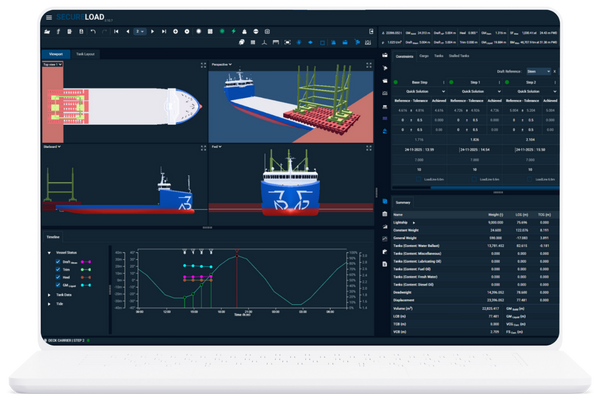
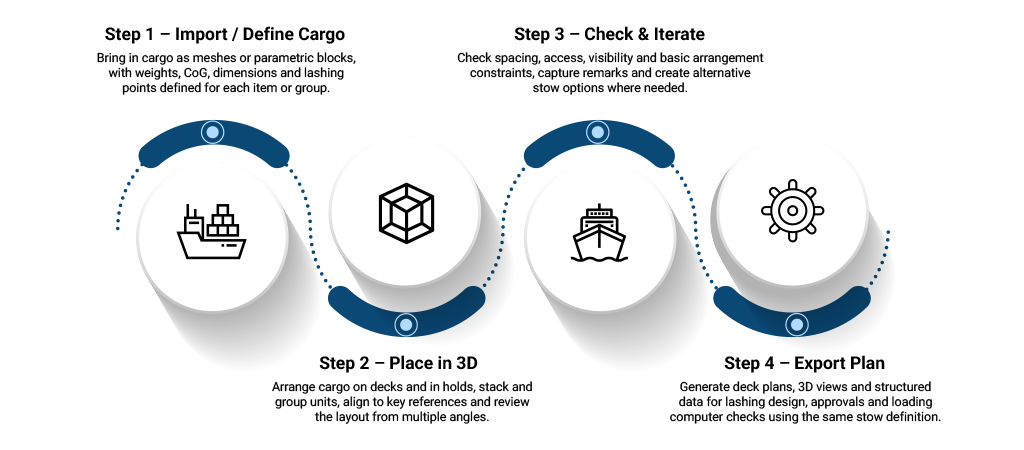
SecureLoad 3D Stowage Planner lets you design stows in 3D using realistic cargo meshes and deck models, not just 2D sketches and PDFs. Check clearances, CoG and key constraints early, and hand over stows that connect cleanly into loading computer and lashing workflows.
Plan Visually. Check Technically. Decide with Confidence.
SecureLoad 3D Stowage Planner gives you a browser-based 3D workspace for MPPs, deck carriers, barges and project cargo campaigns. You see cargo, decks and constraints the way they really are while still keeping a line of sight to the technical checks behind them.
Visual Deck & Hold Layout
Drag, rotate and position cargo directly on realistic vessel geometry - decks, hatches, coamings, obstacles and lashing areas included.
Constraint-Aware Planning
Plan stows with live feedback on clearances, CoG envelopes, visibility and access routes, so impractical layouts are caught early.
Multi-Port Scenarios
Build and compare multi-port plans with partial discharges, re-stows and backloading, without losing track of what’s on deck where.
Hand-Off to Engineering & Operations
Export 3D views, drawings and structured data for engineers, masters and port captains, ready for loading computer and lashing workflows.
Combining containers, project pieces and a heavy unit on the same voyage—testing different positions and stack-ups to keep clearances, CoG and access routes within limits.
Planning a multi-port discharge where tall cargo, cranes and backload units all need to move, without blocking key routes or breaking visibility requirements.
Q1. What cargo formats are supported (meshes, blocks, etc.)?
3D Stowage Planner is designed to work with both parametric “block” cargo (using dimensions, weight and CoG) and mesh-based cargo where detailed geometry is available.
You’ll be able to build a library of common items and import custom pieces for specific projects.
Q2. Can we model multi-port and partial discharge scenarios?
Yes. You can plan multi-port voyages with partial discharges, re-stows and backloading in a single project.
Different conditions (e.g. “After Port A discharge”, “Before Port B arrival”) can be stored and compared without losing track of what sits where.
Q3. How accurate is the geometry versus our real vessels?
Vessel and deck geometry is based on data supplied during the modelling phase (drawings, 3D models, etc.).
The aim is to be close enough for practical stow planning and clearance checks, and to stay consistent with the models used in SecureLoad’s engineering tools.
Q4. Can surveyors or customers view 3D plans without full access?
Yes. 3D stows can be shared as exported views, images or lightweight files so surveyors and customers can review layouts without needing full editing access.
Where appropriate, view-only access options can be explored for selected external stakeholders.
Q5. How does 3D Stowage Planner work with our existing engineering tools?
3D Stowage Planner is designed to sit alongside your current engineering stack.
Stow definitions and outputs can be used as input for motion, lashing and loading checks—either within the SecureLoad ecosystem (Acceleration & 3D Lashing, Loading Computer) or in your existing tools via exported data and views.
Want to See Your Next Project Cargo in 3D?
Share a recent project cargo case and we’ll walk you through how the stow could be planned and reviewed in SecureLoad 3D Stowage Planner.