
Product · Fleet Cargo Planner
Fleet-Wide Cargo Planning and Loadability in One View
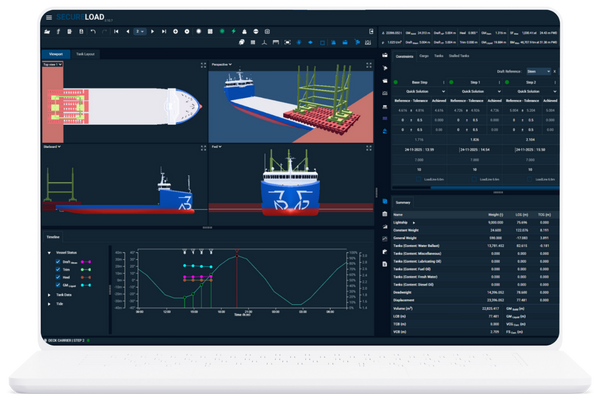
SecureLoad Fleet Cargo Planner gives chartering, engineering and operations a shared, browser-based view of what each vessel can really take before you commit to cargo. See loadability, constraints and risk across the fleet, and drill into the same approved loading cases used onboard.
From Single-Vessel Guesswork to Fleet-Wide Clarity
Fleet Cargo Planner connects office teams to real vessel geometry, loading rules and margins-not rough estimates in spreadsheets.
You can test scenarios across multiple vessels before you fix cargo, so decisions are based on what the ships can actually do.
Real-Time Fleet Perspective

Scenario Planning Before Fixing

Shared View for All Teams

Faster Decisions, Fewer Surprises
Fleet Views Built for Day-to-Day Decisions
Fleet Overview
How it looks
A fleet list (or map + list) with each vessel shown as a row and a simple status chip.
Key elements
- Vessel status at a glance: Available, On voyage, In port, Not suitable.
- Quick indicators per vessel: latest intake margin, key constraints triggered, last scenario update time.
- Filters for real work: vessel class, region, cargo type, laycan window, client/opportunity tags.
Core Calculations
How it looks
Click a vessel to open a side panel or detail screen built on its SecureLoad model.
Key elements
- Stow / loading scenario view with stability, strength and draft margins visible.
- Ballast plan and key condition parameters aligned with the onboard loading computer.
- Multiple candidate scenarios per opportunity (e.g., Option A/B/C) stored against the vessel.
- Tags linking scenarios to specific opportunities, fixtures and projects for later reference.
Standardise How Your Fleet Plans Cargo
Templates
Scenario Templates for Recurring Trades
Save approved loading patterns for your key routes and trades as templates.
Pre-Defined Cargo Mixes and Deck Layouts
Reuse common cargo mixes and deck arrangements instead of rebuilding them each time.
Patterns by Vessel + Route
Create “approved patterns” for specific vessel and route combinations that teams can start from, not reinvent.
Standardisation
Consistent Rules and Limits
Apply the same stability, strength and constraint rules across vessels and opportunities.
Shared Libraries
Maintain shared libraries of cargo types, stow patterns and constraints that everyone pulls from.
Governance & Control
Give supers and engineering the ability to lock critical rules, while still letting planners explore scenarios safely.
KPIs & Reporting
Utilisation Across Fleet
Track deck and hold utilisation across voyages, vessels and routes to see where you’re leaving intake on the table.
Operational Signals
Monitor constraint hits, rework cycles and time-to-approval to find where planning can be improved.
Exportable KPIs
Export key metrics for management reviews, performance dashboards and internal reporting.
Workflow: From First Enquiry to Approved Plan
Capture Opportunity
A new RFQ or cargo enquiry comes in.
You create an opportunity in Fleet Cargo Planner with basic cargo, route and laycan details.Select the vessel, voyage leg and starting condition. Enter cargo pattern and an initial ballast setup in one screen.
Test Across Vessels
Apply the cargo to candidate vessels using standard templates and rules.
See which vessels are viable, which constraints are hit and how close each runs to limits.
Select & Refine
Pick the best-fit vessel and refine the stow and conditions.
Review stability, strength and draft margins, and iterate with engineering as needed.
Hand Over to Execution
Confirm the chosen plan and sync it with the onboard loading computer or ops workflow.
The vessel starts from a vetted scenario instead of building everything from scratch.
Where enabled, 3D Stowage Planner can be used for visual stows in Step 2–3, and approved loading cases are checked and refined using the SecureLoad Loading Computer.
Geometry-Based Licensing Built for Fleets
Instead of counting every individual user, SecureLoad can be licensed around your vessels and their geometry. That means commercial and technical teams can collaborate freely, without worrying about who is “allowed” to open a scenario.
- Scales primarily with the number and type of vessels, not just user seats.
- Shore users can work on the same fleet scenarios without complex per-user pricing.
- Suits owners, operators and engineering partners who need to share cases around the same vessels.
Integrates with Your Existing Tools
Ship Data & Curves
Fleet Cargo Planner uses the same vessel models, curves and limits as the SecureLoad Loading Computer.
You’re not maintaining a separate “planning” copy of the fleet—planning and execution share one technical source of truth.
Commercial & Ops Systems
Keep using your existing TMS, voyage tools and spreadsheets where they make sense.
SecureLoad sits alongside them as the cargo engineering layer, with options to exchange key data points and references at a high level.
Documentation & Exports
Export scenarios, plans and KPIs in formats your teams can use—PDF, Excel or structured data (e.g. JSON) for other systems.
Share results with commercial, operations and partners without forcing everyone into a new UI.
Built for Office Teams Who Make Cargo Decisions
Different teams look at the fleet through different lenses—Fleet Cargo Planner gives them a shared technical picture.
Chartering Managers / Commercial Team
Port Captains & Superintendents
Fleet Operations / Control Room
Monitor loadability, constraints and key cases across the fleet, and coordinate decisions with live technical context.
Naval Architects & Cargo Engineers
Management / Performance & HSEQ
How Operators Use Fleet Cargo Planner
MPP / Heavy-Lift Fleet
Deck Carrier & Barge Operator
Project Logistics / 3PL
Frequently Asked Questions
Q1. How does Fleet Cargo Planner connect to the onboard loading computer?
Q2. What does implementation look like for an existing fleet?
Q3. How accurate are the calculations compared with onboard systems?
Q4. What kind of training do chartering and ops teams need?
Q5. How does licensing work for fleets with mixed vessel types?
Want a Single View of Your Fleet’s Loadability?
Share your vessel list and core trades—we’ll show how Fleet Cargo Planner can support your day-to-day cargo decisions.
